Hey friend,
Lately, I've been thinking a lot about how I handle feedback. I'm working on some exciting new projects that require many hours of work before they're ready for review. My problem is that I become overly attached to these early drafts and the in-the-moment decisions I've made—not because they're actually good yet, but because I've invested so much time into them.
However, no matter how much effort I put in, the flaws stand out to anyone looking at the project with fresh eyes. And when said flaws are pointed out, no matter how right the person pointing them out is, it can feel harsh and I can’t help but feel defensive. The criticism can be easy to dismiss — ‘they’re just being jerks’ — and I want to just ignore the feedback and shrug off the haters. But valid criticism delivered poorly is still valid. In other words, my feelings are irrelevant here. I can't control how other people express their thoughts, but I can control how I react to their words and whether or not to incorporate their feedback to improve the product.
When building websites, and entrepreneurship in general, the product > my feelings.
Anyway, I just wanted to share something I’m reflecting on right now in case any of you are dealing with inarticulate or insensitive clients critiquing your work… especially those annoying ones that might be (annoyingly) right.
Now, let's dive into five new things you should know.
#1 Expanding Panels Plugin Update

We’ve updated (read: Abi updated), the Expanding Panels plugin with some awesome new features. Notably, a vertical layout on desktop, improved smoothness on the animation, and support for up to 10 panels (although tbh, that’s probably too many). Great for showcasing your products, portfolios, service packages, team members, destination guides, case studies, educational content…. basically any place where you want to engage visitors with a more visual and interactive way of displaying content.
This is a FREE upgrade for anyone who’s purchased this plugin before, just grab the updated instructions from the installation page.
#2 - Clickable Thumbnails Tutorials
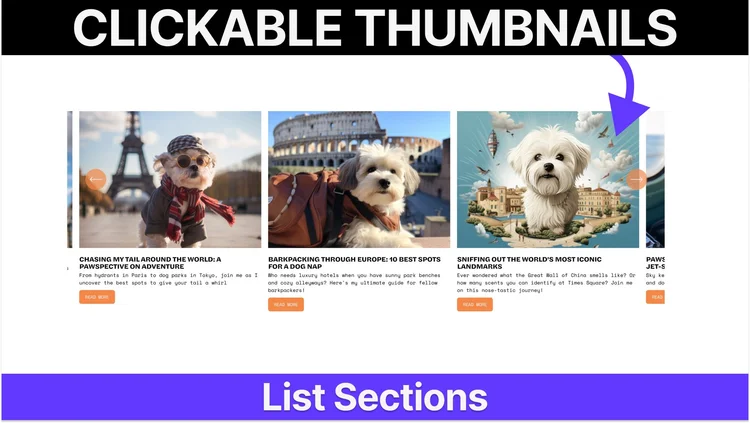
I’ve written 3 new tutorials about how to make your thumbnails clickable in List Sections, one for each layout: Simple Lists, Carousels, and Banner Slideshows. The Carousels and Banner Slideshows were a bit tricky, since we have to differentiate between a click and a click-and-drag to slide, but this code solves that. I’ve also created a short Youtube video to go along with it.
#3 Anchor Links in Squarespace

Squarespace now supports anchor links for page sections. To add one, navigate to Edit Section » Anchor Link. Additionally, from a coding perspective, this is great because it also gives you a way to target specific sections by their anchor link, (#my-anchor-link) instead of the random [data-section-id], which makes our customization code a lot more readable. I’ve updated the Squarespace ID Finder to be able to read these as well.
#4 - Coding for Charity Recap

Two weeks ago, we ran a “Coding for Charity” day and it was an awesome success. We raised over $900 for the Southampton Beaver Scout group, where Abi (our Senior Support Lead at Will-Myers) volunteers. She was able to purchase 3 Tents, 1 Camping Stove, 1 BBQ Griddle Stove & the equipment needed for an Easter event they’re doing for the kids. Big shoutout to everyone who donated. There’s truly not much more important in life than community and it’s super cool to see you all willing to invest in ones that aren’t your own. Things like this make our own little Squarespace community stronger.
#5 State of Web Design Report, Setting Deadlines, and Doing YouTube Right with LaShonda Brown
Apple | Spotify | Everywhere Else

In this episode, Christy and I debrief Squarespace’s State of the Web Design Industry report, share our thoughts on setting deadlines and shipping, and get to pick the creative mind of LaShonda Brown about what has made her YouTube channel such a success.
Apple | Spotify | Everywhere Else
Big shoutout to our sponsor this season, Weglot! THE BEST no-code website translation solution for Squarespace. Use discount code SOMEWHAT15 to get 15% off an annual subscription this year.
Additional Curious Coder updates down below, but that’s all from me today. Hope you all have a good end to your week!
Keep Building,
Will
Code Curious Membership
Code Curious is my membership for professional Squarespace designers. As a member, you get:
20% off all plugins & multi-use licenses
The Code Catalogue with exclusive access to over 100 copy-and-paste code snippets
The Targeting Library with over 270 Squarespace CSS Selectors
A Slack Community for you to engage with other Squarespace Designers
Priority Support on plugins and tutorials
$15 / mo or $150 / yr
Cancel anytime.
Newest Code Catalogue Releases
The Code Catalogue is a library of over 100 advanced customizations for Squarespace websites. (see all snippets)
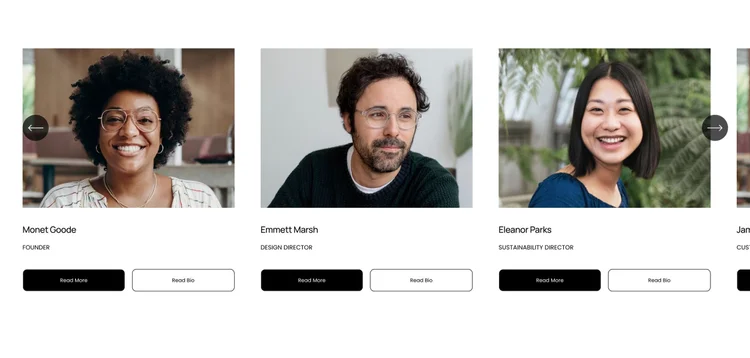
Dual List Section Buttons
Add a second button to your list section area.

Webinar - CSS Variables
Learn all about CSS variables and get the list of all the color variables Squarespace offers.

Hover Cards for List Carousel
Add a hover effect to display list item description & buttons

Video Block Selectors + Customizations
All the video block selectors + some new customizations.